
Software updates
Product Servicing
Updates for MPL50 Li
Periodically, we release software updates to keep your equipment running smoothly. You can use the below to update the software for your MPL50 Li battery charger. Find the latest software and instructions so you can update your MPL50 Li.
Please note, you will need an MPL50 Li software update cable. If you don’t have one, you can purchase one here.
01
02
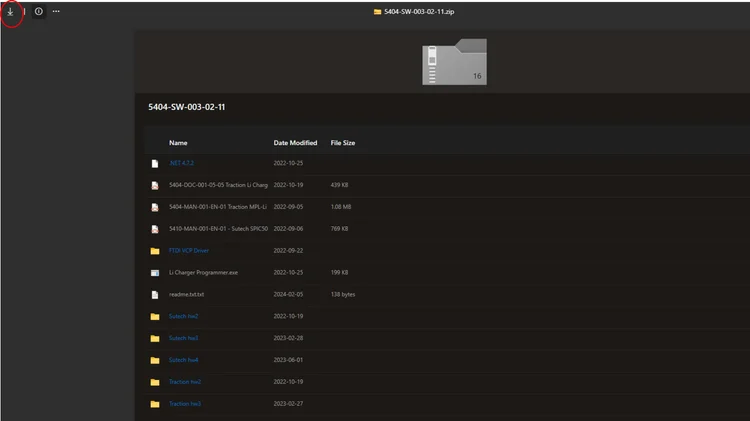
Once downloaded, un-zip the file.
Please note, some PC/Computers may require drivers to upload the software to the battery charger. If this is the case, please download the VCP drivers from this link and follow the on-screen instructions)
03
Before proceeding, ensure the battery charger is off.
04
05
06
Open the ‘Li Charger Programmer’ application.
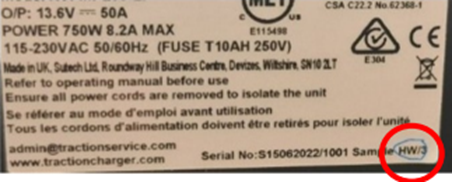
In the dropdown window, select the correct charger type.
To find your correct charger type, please look at the back of your charger or follow these instructions
The serial port should automatically update and then turn the charger on
07
Press ‘Program Unit’. It should show ‘Updating’ and then ‘Finished’. This should take around 15 seconds to complete.
08
Download the software update ZIP file here
Close the programmer software and power down the battery charger
Your charger will now be running the latest software version!

Require support?
Battery maintenance is far from straight forward, but our UK-based team can help make it simple. From diagnosing equipment faults to supporting you with software updates, we have you covered.